AI Chatbot for Business: How to Build One Customers Use
10 min read
To build an AI chatbot customers actually use, start with a small set of questions it can answer reliably, ground every answer in your approved business knowledge, let it take real actions like creating a ticket, make it easy to reach a human, and measure whether problems get resolved, not just whether chats stay inside the bot. Customers are open to AI. What they won't forgive is a chatbot that wastes their time.
Here's what 2026 research says about why most business chatbots go unused, and seven steps to launch one that earns a second visit.
Key takeaways
- In Gartner's 2026 survey, 49% of customers said they'd have used a chatbot, but only 7% actually did in their last service interaction.
- Only 27% of customers would try a chatbot again after a bad experience.
- 87% say a company using GenAI for service must offer a way to reach a human.
- Reliable, narrow and honest beats ambitious and unreliable. Expand scope only once the basics work.
Why don't customers use company chatbots?
Gartner surveyed 3,566 B2B and B2C customers in February and March 2026. The results are a useful reality check for anyone planning a chatbot:
- Willing, but not using. 49% of customers said they would have been willing to use a chatbot if the company had provided one, but only 7% used a chatbot or digital assistant in their most recent service interaction.
- One strike and you're out. Only 27% would be willing to try a chatbot again after a negative experience.
- They're using someone else's AI. Customers were roughly three times more likely to use third-party GenAI tools, such as ChatGPT, Gemini or Copilot, than a company's own chatbot. Company chatbot use has been statistically flat since 2022.
- They want a way out. 87% say it's essential for companies using GenAI in service to offer an option to reach a human agent.
The pattern is clear. Customers like AI. They don't like chatbots that misunderstand them, give generic answers or block them from a person.
What do customers expect from an AI chatbot now?
Three things come through in the research:
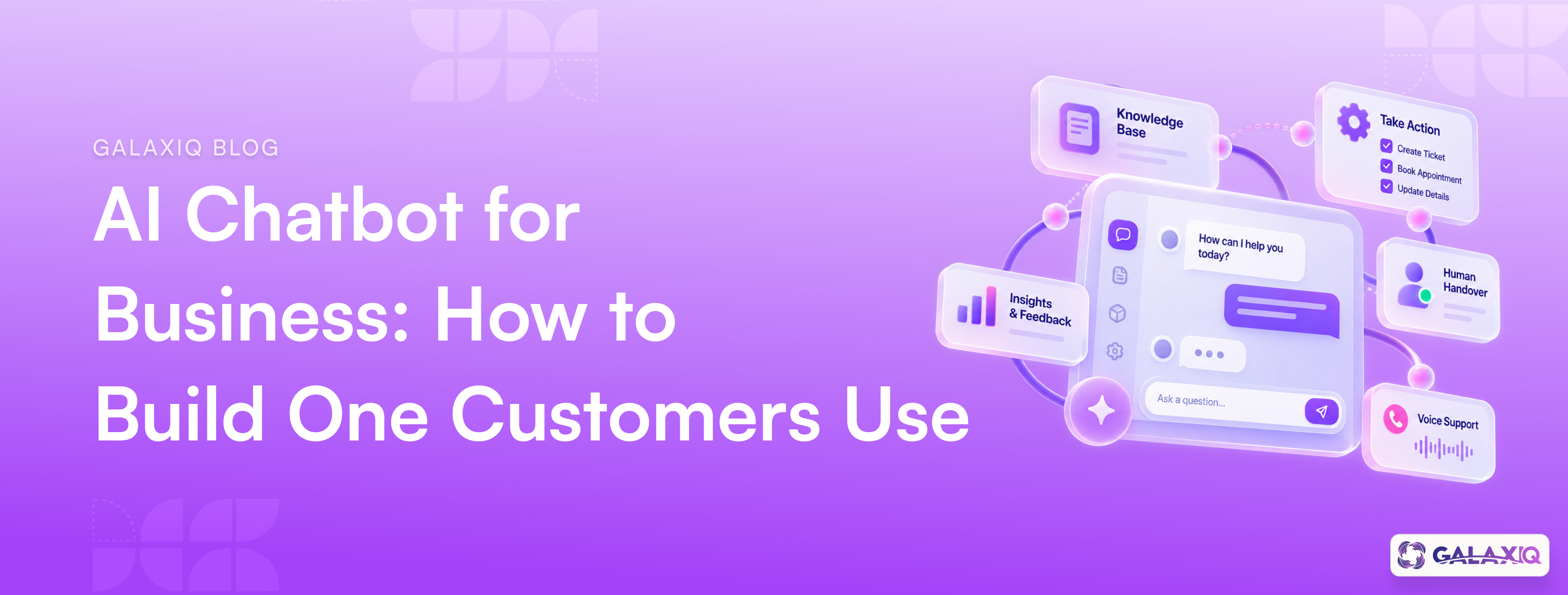
1. Action, not just answers. Among customers who use GenAI, 58% have used it to complete a task on their behalf, rising to 74% in B2B. They expect a chatbot to book, update or submit things, not just link to an FAQ page.
2. Answers that are actually right. Generic, made-up or out-of-date answers are what drive people away after one try.
3. A clear path to a human. When Gartner asked customers who weren't willing to use AI what would change their mind, the most common answer was the ability to switch to a human if needed.
How to build an AI chatbot customers trust: 7 steps
Step 1: Start with questions it can answer reliably
Pull your most common customer questions from emails, call notes and support tickets. Pick the 10 to 20 that are frequent, have clear answers and are low-risk. That's your launch scope.
Gartner's advice to service leaders is the same: prioritise reliability over reach. A chatbot that reliably resolves a targeted set of issues builds more confidence than one that attempts everything and often fails.
Step 2: Ground it in approved business knowledge
Train the chatbot on your own content: website pages, product information, policies and help documents. Then check that each source is current. If the returns policy changed last month, the chatbot needs to know.
A chatbot working from generic internet knowledge will sound confident and be wrong. Grounding it in approved sources is the single biggest fix for wrong answers.
Step 3: Make it sound like your brand
Your chatbot is often the first conversation someone has with your brand. Give it your voice, tone and banned phrases, the same rules your content team uses.
And be upfront that it's AI. Customers trust a chatbot more when it's honest about what it is.
Step 4: Let it take action
Connect the chatbot to the actions customers actually want: creating a support ticket, booking an appointment, updating details, checking an order. Every action it can complete is a reason for the customer to come back. A chatbot that takes action is really a customer conversation agent. (Here's more on AI marketing agents and how to start with one
Step 5: Build the human handover in from day one
Don't hide the exit. Make it obvious how to reach a person, and pass the full conversation to them so the customer doesn't have to repeat themselves.
Set rules for when the chatbot should hand over on its own: when it isn't confident, when the customer is frustrated, or when the topic is sensitive, like a complaint or a billing dispute.
Step 6: Add voice where your customers call
Many customers still pick up the phone, especially for urgent or complex issues. AI voice agents can answer calls, handle routine requests and route the rest, using the same knowledge and brand voice as your chatbot. Gartner recommends balancing chatbot investment with AI in the voice channel for exactly this reason.
Step 7: Measure resolution, not containment
"Containment" (chats that never reached a human) looks good on a dashboard but can hide frustrated customers who gave up. Track these instead:
- Resolution rate: did the customer's problem actually get solved?
- Repeat use: do customers come back to the chatbot next time?
- Handover quality: when a human took over, did they have the context?
- Knowledge gaps: which questions did the chatbot fail on? Add those answers to its knowledge, one by one.
Then expand the scope gradually, adding new topics only once current ones perform well.
Your chatbot is also a marketing tool
Every conversation tells you what customers want, what confuses them and how they feel. Most businesses leave that data sitting in a chat log.
Treat it as insight: track the most common questions, rising complaints and sentiment over time, and feed it back into your content, campaigns and product pages. (If you want to ask that data questions in plain English, here's our guide to conversational analytics for marketing (/blog/conversational-analytics-for-marketing/).)
How Aivora by GalaxiQ handles this
Aivora by GalaxiQ is the conversational AI product inside GalaxiQ's enterprise AI marketing platform (/). It's built around the steps above:
- Grounded answers: you train it on your websites, documents, policies and product information, and it responds from approved business knowledge.
- No-code setup: customise the interface, welcome messages and response behaviour with a live preview before publishing.
- Action: it creates and organises service tickets by status, priority and owner.
- Human takeover: your team can monitor conversations live and step in, with the full customer context kept.
- Voice agents: configure inbound and outbound voice agents with their own role, voice, personality and phone number.
- On-brand by default: it uses the brand voice defined in BrandForge.
- Insight: intent and sentiment from conversations flow into InsightIQ and EdgeIQ, so every chat improves your reporting and targeting.
Frequently asked questions
Opinions are split. In Gartner's 2026 survey, 50% of customers said their interactions are easier when companies use GenAI, but 87% said companies must offer a way to reach a human. Customers like chatbots that solve problems quickly and dislike ones that block them from a person.